Logits, logprobs, and temperature
Vocabulary
LLMs are smart “next token predictors”. Token by token, they generate responses, based on the probabilities of what token may come next, out of all tokens in the model’s vocabulary.
For example, gpt-4 has a vocabulary of 100278 tokens, each with its own ID (position) and value. We can see vocabulary as a very high-dimensional vector:
Tokens have very different values. There are obvious ones like single letters, digits or special characters (as we see !, #, A, or B above), whole words (like cat or window) or parts (like ing, urity). Tokens are also case sensitive, and many of them have a version with a leading space. Thus, we can have four different tokens like window, Window, _window and _Window (I’ve used _ to denote whitespace for clarity).
There are also some surprises hiding there. For example, the longest token in gpt-4 represents 128 empty space ( ) characters. And there are many similar, like with 96, 88 or 80 * stars (yes, coming from training on source code and other formatted texts). And the longest “word” is .translatesAutoresizingMaskIntoConstraints. You can use a tool like https://tiktokenizer.vercel.app to play with tokens online.
Logits
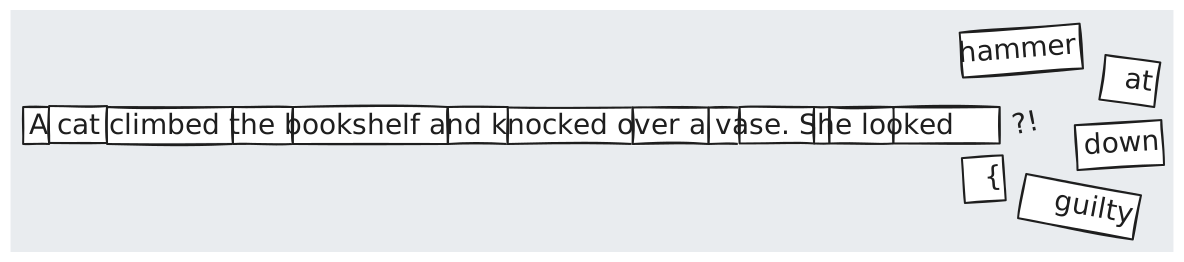
So, when at some point in time our LLM generated A cat climbed the bookshelf and knocked over a vase. She looked, it calculated the “odds” of every next possible token from its vocabulary. Some are obvious nonsense in such a context. We don’t expect tokens like {, ******* or .translatesAutoresizingMaskIntoConstraints to be selected here. But some are much more “probable”, like _guilty or _down (note that most probably we need whitespace after the previous word).
The output layer of LLM is producing a score for each token in the model’s vocabulary - so called logits (“log-odds,” the logarithm of the odds of each token). Let’s denote them as $l_i$ (a logit for a token $i$). They are raw, not normalized numerical predictions to represent model’s “confidence” about each token being the next in the sequence. And they are just numbers ranging from $-\infty$ to $+\infty$.
At the last stage, LLM converts them to a probability distribution - where all values sum to 1.0 and have values between 0.0 and 1.0 - with the help of Softmax function, which looks like this:
\[p(x_i) = \text{softmax}(x_i) = \frac{e^{l_i}}{\sum_{j=1}^{n} e^{l_j}}\]Note: Typically logits are also normalized by substracing their maximum value, to make calculations more stable.
The idea behind Softmax function is simple - it uses the expotential function $e^x$ to produce non-negative value for each logit, from which we can then calculate its ratio against the sum of all other expotentiated logits.
Temperature
But here comes the simple trick called temperature. What if we would scale each logit before expotentiation, by some value $T$:
\[p(x_i) = \text{softmax}(x_i) = \frac{e^{ {l_i}/T}}{\sum_{j=1}^{n} e^{ {l_j}/T}}\]Such scaling gives a nice consequence, visible on the below graph:
- for $T > 1$ the curve is flattened, making differences between each exponentiated logit (relative probability) smaller. The bigger $T$, the smaller the differences between resulting probabilities
- for $T < 1$ the curve becomes steeper, making bigger differences. The smaller $T$, the bigger the differences between the most probable logits (right side of the graph) vs the least probable ones (left side of the graph)
{
  "data": [
    {
      "x": [-3, -2.5, -2, -1.5, -1, -0.5, 0, 0.5, 1, 1.5, 2, 2.5, 3],
      "y": [0.049, 0.082, 0.135, 0.223, 0.368, 0.606, 1, 1.648, 2.718, 4.481, 7.389, 12.182, 20.085],
      "type": "scatter",
      "mode": "lines+markers",
      "name": "e^x (T=1.0)"
    },
    {
      "x": [-3, -2.5, -2, -1.5, -1, -0.5, 0, 0.5, 1, 1.5, 2, 2.5, 3],
      "y": [0.002, 0.007, 0.018, 0.050, 0.135, 0.368, 1, 2.718, 7.389, 20.086, 54.598, 148.413, 403.429],
      "type": "scatter",
      "mode": "lines+markers",
      "name": "e^(x/0.5) (T=0.5)"
    },
    {
      "x": [-3, -2.5, -2, -1.5, -1, -0.5, 0, 0.5, 1, 1.5, 2, 2.5, 3],
      "y": [0.223, 0.287, 0.368, 0.472, 0.607, 0.779, 1, 1.284, 1.649, 2.117, 2.718, 3.490, 4.482],
      "type": "scatter",
      "mode": "lines+markers",
      "name": "e^(x/2.0) (T=2.0)"
    }
  ],
  "layout": {
    "title": "Effect of Temperature on Exponential Growth",
    "paper_bgcolor": "rgba(0,0,0,0)",
    "plot_bgcolor": "rgba(0,0,0,0)",
    "xaxis": {
      "title": "Logit value (x)"
    },
    "yaxis": {
      "title": "Exponential value (e^(x/T))",
      "range": [0, 20]
    }
  },
  "config": {
    "displayModeBar": false,
    "responsive": true
  }
}
Let’s see how these temperatures affect the final probability distribution for a specific set of logit values like $2$, $1$, $-0.5$ and $-3$:
- $T=1.0$ - the standard Softmax distribution. We can treat it as our baseline
- $T=0.5$ (Low Temperature) - the probabilities become “sharper”. The highest logit (of value $2$) becomes significantly more probable (from ~$68\% \rightarrow 88\%$), while the lower ones are “suppressed”
- $T=2.0$ (High Temperature) - the probabilities become “flatter”. The gap between the most and least probable tokens becomes smaller, making the distribution more uniform
{
  "data": [
    {
      "x": ["Token A (2.0)", "Token B (1.0)", "Token C (-0.5)", "Token D (-3.0)"],
      "y": [0.8756, 0.1185, 0.0059, 0.0000],
      "name": "T=0.5 (Sharper)",
      "type": "bar"
    },
    {
      "x": ["Token A (2.0)", "Token B (1.0)", "Token C (-0.5)", "Token D (-3.0)"],
      "y": [0.6865, 0.2525, 0.0564, 0.0046],
      "name": "T=1.0 (Standard)",
      "type": "bar"
    },
    {
      "x": ["Token A (2.0)", "Token B (1.0)", "Token C (-0.5)", "Token D (-3.0)"],
      "y": [0.5062, 0.3071, 0.1451, 0.0415],
      "name": "T=2.0 (Flatter)",
      "type": "bar"
    }
  ],
  "layout": {
    "title": "Probability Distribution vs Temperature",
    "paper_bgcolor": "rgba(0,0,0,0)",
    "plot_bgcolor": "rgba(0,0,0,0)",
    "barmode": "group",
    "xaxis": {
      "title": "Logits"
    },
    "yaxis": {
      "title": "Probability",
      "range": [0, 1]
    }
  },
  "config": {
    "displayModeBar": false,
    "responsive": true
  }
}
What about $T=0.0$? Mathematically, we can’t divide by zero. So, in practice, LLMs treat this as a limit - as the temperature approaches zero, the distribution becomes infinitely sharp. At $0.0$ the model simply picks the token with the highest logit and gives it 100% probability, turning the “soft” max into a “hard” max (also called $argmax$ function).
Logprobs
What we’ve seen so far is how the model calculates probabilities internally. But some models/providers allow us to observe the output of such probability calculations in the form of so-called logprobs (Log Probabilities, let’s denote them as $lp$). It’s possible via API call options like IncludeLogProbabilities or Logbprobs (we will play with them more in the upcoming blog post - Update: it’s already published).
Logprobs are natural logarithms of the probability ($ln(p)$). They are already normalized by the model’s Softmax and temperature internally - in other words, the Softmax and temperature have already happened inside the model when we receive them from the API. They take values from $-\infty$ to $0$ (always negative or zero), as they represent probabilities from the range $[0.0, 1.0]$. To calculate probabilities out of it we just need to call $e^x$ on them (inverse of natural logaritm). For example:
\[{lp}=0.0 \text{ so } p = e^{0.0} = 1.0 \text{ (100%)}\] \[{lp}=-0.69 \text{ so } p = e^{-0.69} \approx 0.5 \text{ (50%)}\] \[{lp}=-4.6 \text{ so } p = e^{-4.6} \approx 0.01 \text{ (1%)}\]Let’s return to our A cat climbed the bookshelf and knocked over a vase. She looked example. When we ask for logprobs we will get them for all tokens in the sequence (including the last one, not yet shown here). We can treat logprobes as yet another high-dimensional vector of logprobs values for each token in the model’s vocabulary.
Here’s the real example of logprobes returned for gpt-4 model and the token after looked (13-th index in sequence):
By mapping positions/ids of tokens around the highest values, we will see that they correspond to the following tokens:
\[[ \cdots, \underbrace{\text{ant}}_{id_{519}}, \underbrace{\text{ at}}_{id_{520}}, \underbrace{\text{ase}}_{id_{521}} \cdots, \underbrace{\text{ back}}_{id_{1203}}, \cdots, \underbrace{\text{ down}}_{id_{1523}}, \cdots, \underbrace{\text{ around}}_{id_{2212}}, \cdots, \underbrace{\text{ proud}}_{id_{12691}}, \cdots, \underbrace{\text{ surprised}}_{id_{14792}}, \cdots, \underbrace{\text{ guilty}}_{id_{16390}}, \cdots \underbrace{\text{ innocent}}_{id_{25226}}, \cdots ]\]Not all tokens were presented in the above $\mathbf{L}$ but we see an example for tokens $519$ (ant, very low value), $520$ (_at, pretty high value) and $521$ (_ase, again with very low value.)
And here’s the graph presenting values for those top 8 the highest valued logprobes:
{
  "data": [
    {
      "x": [
        "innocent",
        "at",
        "proud",
        "surprised",
        "down",
        "around",
        "guilty",
        "back"
      ],
      "y": [
        -0.61,
        -1.11,
        -2.98,
        -3.86,
        -4.11,
        -4.48,
        -5.23,
        -5.61
      ],
      "name": "Logit",
      "type": "bar"
    }
  ],
  "layout": {
    "title": "Raw Logits",
    "paper_bgcolor": "rgba(0,0,0,0)",
    "plot_bgcolor": "rgba(0,0,0,0)"
  },
  "config": {
    "displayModeBar": false,
    "responsive": true
  }
}
By just $p_i = e^{{lp}_i}$ we get corresponding probabilities:
{
  "data": [
    {
      "x": [
        "innocent",
        "at",
        "proud",
        "surprised",
        "down",
        "around",
        "guilty",
        "back"
      ],
      "y": [
        0.5536,
        0.3358,
        0.0517,
        0.0215,
        0.0167,
        0.0115,
        0.0055,
        0.0037
      ],
      "name": "Probability",
      "type": "bar"
    }
  ],
  "layout": {
    "title": "Probabilities (T=1.0)",
    "paper_bgcolor": "rgba(0,0,0,0)",
    "plot_bgcolor": "rgba(0,0,0,0)",
    "xaxis": {
      "automargin": true
    },
    "yaxis": {
      "automargin": true
    }
  },
  "config": {
    "displayModeBar": false,
    "responsive": true
  }
}
Note: Logprobes returned by API are truncated to top $n$ values, so calculated probabilities won’t sum to 1.0
With the help of logprobes we can nicely visualize how temperature influences the resulting probabilities for our sentence:
{
  "data": [
    {
      "x": [
        "innocent",
        "at",
        "proud",
        "surprised",
        "down",
        "around",
        "guilty",
        "back"
      ],
      "y": [
        0.3596,
        0.28,
        0.1099,
        0.0708,
        0.0625,
        0.0519,
        0.0357,
        0.0295
      ],
      "name": "T=2.0",
      "type": "bar"
    },
    {
      "x": [
        "innocent",
        "at",
        "proud",
        "surprised",
        "down",
        "around",
        "guilty",
        "back"
      ],
      "y": [
        0.5536,
        0.3358,
        0.0517,
        0.0215,
        0.0167,
        0.0115,
        0.0055,
        0.0037
      ],
      "name": "T=1.0",
      "type": "bar"
    },
    {
      "x": [
        "innocent",
        "at",
        "proud",
        "surprised",
        "down",
        "around",
        "guilty",
        "back"
      ],
      "y": [
        0.7248,
        0.2667,
        0.0063,
        0.0011,
        0.0007,
        0.0003,
        0.0001,
        0.0
      ],
      "name": "T=0.5",
      "type": "bar"
    },
    {
      "x": [
        "innocent",
        "at",
        "proud",
        "surprised",
        "down",
        "around",
        "guilty",
        "back"
      ],
      "y": [
        0.9933,
        0.0067,
        0.0,
        0.0,
        0.0,
        0.0,
        0.0,
        0.0
      ],
      "name": "T=0.1",
      "type": "bar"
    }
  ],
  "layout": {
    "title": "Temperature Comparison (T=1.0 vs T=0.5 vs T=0.1)",
    "paper_bgcolor": "rgba(0,0,0,0)",
    "plot_bgcolor": "rgba(0,0,0,0)",
    "xaxis": {
      "automargin": true
    },
    "yaxis": {
      "automargin": true
    },
    "barmode": "group"
  },
  "config": {
    "displayModeBar": false,
    "responsive": true
  }
}
We clearly see, in the real-world example, that:
- by setting high temperature like $T = 2.0$ we make many tokens more probable. It could be interpreted as the model being “more creative” (or less constrained)
- by setting lower temperatures like $T = 0.1$ we definitely “boost” most probable tokens at the expense of the remaining tokens. The model becomes more predictable (“less creative”, if you wish)
That’s it for now! In the next blog post we will dive into visualizing logprobs in a nicer way. We also have yet to cover sampling methods like “top-k” and “top-p”, but that’s also a topic for another day.
Enjoy Reading This Article?
Here are some more articles you might like to read next: